
How Kanban relates to Scrum and helps you implement it
Quick summary: how Kanban helps Scrum
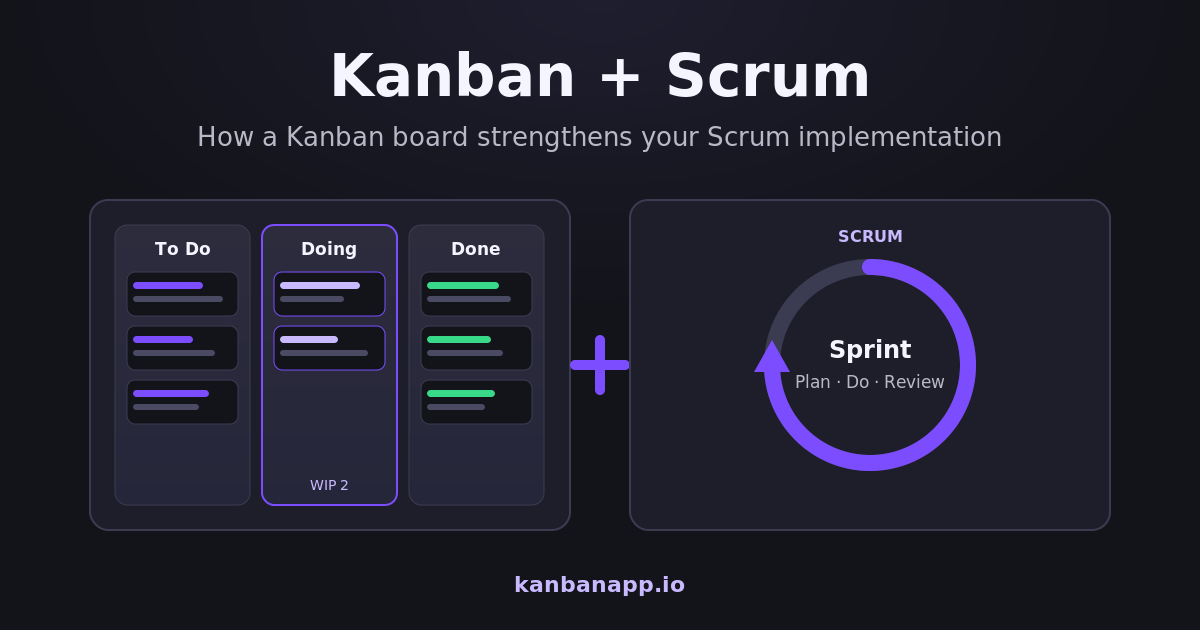
Scrum organizes work in Sprints with events and roles; Kanban makes the flow of that work visible on a board.
Used together, the Sprint Backlog becomes columns and cards, WIP limits stop the team from starting everything at once, and flow metrics such as Lead Time and Throughput add predictability.
The result is a Scrum implementation with fewer invisible queues, earlier detection of blockers and more items actually finished — a combination often called Scrumban.
Before diving into reading:
Scrum and Kanban are two widely used approaches to project management, especially in software development. Although they have important differences, they do not need to be treated as competing methods. In practice, Kanban can complement Scrum, making work more visible, organized and predictable.
Scrum provides a structure for planning, executing and reviewing work in short cycles. Kanban offers visual mechanisms and flow management principles that help the team understand how tasks are progressing.
When used together, Scrum and Kanban can improve communication, reduce blockers and increase the team's delivery capacity.
1) What is Scrum?
Scrum is an agile framework used to develop complex products incrementally. Work is divided into cycles called Sprints, which usually last between one and four weeks.
During a Sprint, the team selects a set of items from the Product Backlog and works to turn them into a usable increment of the product.
Scrum establishes accountabilities, events and artifacts that help organize the process. The main elements of Scrum include:
- Product Backlog;
- Sprint Backlog;
- Sprint Planning;
- Daily Scrum;
- Sprint Review;
- Sprint Retrospective;
- Product Owner;
- Scrum Master;
- Developers.
Although it provides a clear structure, Scrum does not specify in detail how tasks should move during the Sprint. That is exactly where Kanban can contribute.
2) What is Kanban?
Kanban is a method for managing work visually. Its goal is to improve the flow of activities by making visible what is being worked on, what is waiting and what has already been completed.
The best-known representation of Kanban is the board divided into columns, such as:
To Do → In Progress → In Review → Done
Each activity is represented by a card that moves across the stages as the work advances.
Kanban, however, is not just about using a board. The method also involves practices such as:
- visualizing the workflow;
- limiting work in progress;
- identifying blockers;
- managing flow;
- establishing explicit policies;
- pursuing continuous improvement.
A Scrum team can adopt these practices without abandoning Sprints or any other element of the framework. If you want to go deeper into the method itself, see the complete guide to Kanban.
3) How does Kanban correlate with Scrum?
Scrum and Kanban share several principles related to agility, transparency and continuous improvement. Both encourage:
- frequent deliveries;
- adaptation to change;
- collaboration among team members;
- transparency about the status of the work;
- constant analysis of the process;
- fast identification of problems.
The main difference lies in how the work is organized. In Scrum, the team works in defined cycles with commitments tied to the Sprint Goal. In Kanban, the main focus is continuous flow and the capacity of the system.
That is why Kanban can work as a visual management layer inside Scrum. The team keeps using Sprints, planning, retrospectives and goals, but starts tracking task progress through a more explicit flow.
This combination is often called Scrumban, although not every team that uses Kanban practices inside Scrum needs to formally adopt that name.
4) The Kanban board makes the Sprint visible
One of Kanban's most immediate contributions to Scrum is the visualization of the Sprint Backlog. After Sprint Planning, the selected items can be placed on a board whose columns represent the real stages of the team's process. One example:
Sprint Backlog → In Development → In Code Review → In Testing → Ready for Delivery
This structure lets everyone quickly understand:
- which activities have not started yet;
- which tasks are being executed;
- where blockers exist;
- which stages are accumulating work;
- which items are already done.
The board also makes the Daily Scrum easier, because the team can analyze the flow of work instead of only sharing individual reports. The conversation stops being just "what each person did" and starts considering questions such as:
- Which task is stuck?
- What is preventing progress toward the Sprint Goal?
- Is work piling up at any stage?
- Is the team starting more tasks than it can finish?
5) Work-in-progress limits prevent overload
One of the most important Kanban practices is limiting Work in Progress, or WIP, which represents the amount of work in progress at the same time.
Without limits, team members may start several tasks simultaneously. As a result, many activities remain partially complete and few actually reach the end of the process.
Imagine a team with eight tasks in development and only one person available to review them. In that scenario, work starts piling up at the review stage.
With a WIP limit, the team can decide that only three tasks may be in development at the same time. When the limit is reached, team members collaborate to finish or unblock the existing activities before starting new ones.
This helps a Scrum team:
- reduce constant context switching;
- avoid stalled tasks;
- improve collaboration;
- finish items more frequently;
- keep the focus on the Sprint Goal.
The principle is simple: start fewer activities in order to finish more.
6) Kanban helps identify bottlenecks
A bottleneck happens when a stage cannot keep up with the pace of the stages before it.
For example, a team may develop new features quickly but have limited testing capacity. Over time, several cards accumulate in the "In Testing" column.
Without a visual representation, this problem can take a long time to be noticed. On a Kanban board, the accumulation becomes evident. The team can then discuss solutions, such as:
- developers helping create tests;
- automating part of the checks;
- reviewing the acceptance criteria;
- splitting tasks that are too large;
- temporarily reorganizing responsibilities;
- avoiding the start of new features.
This analysis is especially useful during the Daily Scrum and the Sprint Retrospective.
7) Kanban improves the Daily Scrum
The Daily Scrum should help the Developers inspect progress toward the Sprint Goal and adjust the plan.
When the team uses a Kanban board, the meeting can be run by walking the flow from right to left. First, the tasks closest to completion are analyzed. Then the team checks what needs to happen to move the remaining items forward.
This approach encourages finishing work before starting new activities. Instead of each participant simply reporting individual actions, the team talks about the work as a collective system.
The focus becomes: how can we work together to move the Sprint closer to its goal?
8) Kanban helps split large tasks
When a card stays in the same column for many days, it may indicate that the activity is too large, poorly defined or has an unidentified dependency. The board makes this problem visible.
The team can split the activity into smaller parts, each producing some verifiable progress. This makes development, testing, review and validation easier.
Smaller items also help to:
- track progress more precisely;
- reduce risk;
- get feedback earlier;
- detect errors quickly;
- increase the frequency of completion.
This practice reinforces the incremental delivery proposed by Scrum.
9) Kanban metrics increase predictability
Kanban can also add important metrics to Scrum.
One of them is Lead Time, the time between the request of an item and its delivery. Another is Cycle Time, the time between the actual start of the work and its completion. The team can also track Throughput, which indicates how many items are completed in a given period.
This information helps answer questions such as:
- How long does a task usually take to be completed?
- How many items can the team deliver in a Sprint?
- At which stage do activities stay the longest?
- Is the flow improving or getting worse?
- Is the amount of work in progress adequate?
These metrics should not be used to evaluate individual team members. They should be used to understand and improve the work system as a whole.
10) Kanban strengthens the Sprint Retrospective
In the Sprint Retrospective, the team analyzes its process and identifies improvement opportunities. The Kanban board and its metrics provide concrete evidence for that discussion.
The team may observe, for example, that:
- many tasks piled up in review;
- large items took a long time to move forward;
- the work-in-progress limit was exceeded;
- certain activities stayed blocked for several days;
- tasks were started close to the end of the Sprint;
- the average completion time increased.
From this information, the team can create specific improvement actions for the next Sprint. Instead of relying only on the participants' perception, the retrospective starts using visual data about the real flow of work.
11) An example of using both together
Consider a team that works in two-week Sprints. During Sprint Planning, ten items are selected for the Sprint Backlog and placed on a board with the following columns:
To Do → Development → Review → Testing → Done
The team sets the following limits:
- at most three items in development;
- at most two items in review;
- at most two items in testing.
During the Sprint, the testing column reaches its limit. At that moment, team members avoid starting new tasks and collaborate to finish the ongoing tests.
In the Daily Scrum, the team identifies that one item is blocked because it depends on external information. The impediment is handled quickly.
At the end of the Sprint, eight items are done. In the retrospective, the team notices that the larger items stayed longer in development and decides to split them better in the next Sprints.
In this example, Scrum organized the work cycle, the goals and the events. Kanban helped visualize and control the flow within that cycle.
12) How to start using Kanban in a Scrum team
Adoption can be gradual.
The first step is to represent on the board the real stages an activity goes through. There is no need to create an overly complex flow: the columns should reflect the process the team actually uses.
Next, it is important to define clear criteria for moving cards. The team needs to know what it means for a task to be "in development", "in review", "in testing" or "done".
Then, initial work-in-progress limits can be established. These limits should be adjusted as the team learns about its own capacity.
It is also advisable to record blockers and observe how long items stay at each stage. Over time, the team can start using flow metrics and bring that data into its retrospectives.
You can start today with a simple board: KanbanApp opens directly in the browser at https://kanbanapp.io/kanbanapp.html, with no account and no setup, and works offline as explained in the Offline Kanban article.
13) Points of attention when combining Scrum and Kanban
Combining the two approaches should improve the process, not create additional bureaucracy.
The board must represent reality. When cards are not updated, the information stops being reliable. WIP limits must also be respected: if they are constantly exceeded, they stop serving their purpose.
Another important caution is not to use the metrics to pressure or compare individual team members. The work done by a team involves different levels of complexity and collaboration.
Finally, using a Kanban board does not mean abandoning the Sprint Goal. Flow management should help the team reach that goal, not turn the Sprint into a simple list of independent tasks.
14) Conclusion
Scrum and Kanban can be used in a complementary way. Scrum provides a structure to organize accountabilities, events, goals and delivery cycles. Kanban helps visualize the work, limit simultaneous activities, identify bottlenecks and improve flow.
By adopting Kanban practices, a Scrum team can see much more clearly what is happening during the Sprint. Problems become visible earlier, collaboration increases and the focus shifts from the number of tasks started to the amount of value actually delivered.
Kanban therefore does not need to replace Scrum. It can work as a powerful tool to make your Scrum implementation more transparent, efficient and oriented toward continuous improvement.